
In my previous post, I examined where goal-based agentic testing fits within the mobile automation pyramid. The conclusion was simple: it doesn’t replace traditional UI automation; it complements it.
The next question was straightforward: how do you actually write one?
One thing I’ve noticed when reading about agentic testing is that everyone seems to focus on the technology. We hear about AI agents, natural language prompts, and autonomous exploration, but very little is said about the quality of the goal itself.
The reality is simple:
If the goal isn’t well defined, it doesn’t really matter how intelligent the agent is.
Poor goals usually produce poor tests.
So what makes a good goal?
Focus on the Outcome, Not the Journey
Traditional UI automation specifies exactly how the framework should complete a task.
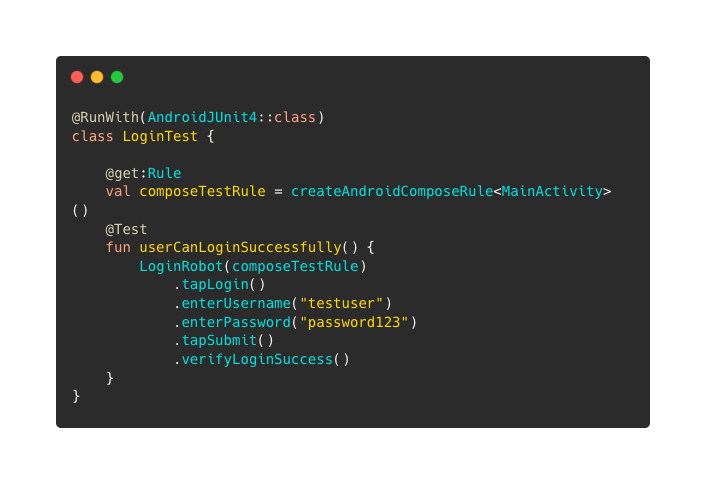
Goal-based testing turns that around:
Instead of describing every interaction, we describe the desired outcome.
A registered user can authenticate and reach the Home screen.
Notice what’s missing:
There’s no mention of buttons.
No activity names.
No implementation details.
The goal doesn’t care whether the login button is blue or green, or whether it has moved to another screen. It simply describes what success looks like.
That gives the agent the flexibility to adapt if the UI changes without immediately breaking the test.
Keep the Goal Small
One mistake is trying to automate an entire user journey with a single goal.
Something like:
A user signs in, browses products, adds three items to their basket, applies a discount code, completes payment and receives an email confirmation.
That isn’t really a goal.
That’s an end-to-end regression test.
Smaller goals are easier to understand, debug, and maintain.
Instead, split that journey into several goals.
A registered user can sign in.
A user can add an item to their basket.
A user can complete checkout.
A confirmation screen is displayed.
Each goal validates a single outcome.
If one fails, you’ll know exactly where to start looking.
Avoid Describing Today's UI
One of the biggest advantages of agentic testing is that it isn’t tied to a rigid sequence of UI interactions.
You lose that advantage the moment your goal starts describing the interface.
For example:
Tap the blue Login button on the landing page.
That might work today.
What happens when the design team changes the colour?
Or renames the button?
Or moves authentication behind a navigation drawer?
None of those changes alters the business goal.
The user still wants to sign in.
Describe what the user wants to achieve, not how today’s interface happens to work.
Make Success Easy to Measure
Every goal needs a clear definition of success.
Otherwise, the testing agent has to make assumptions.
Instead of writing:
Login works correctly.
Be specific.
Success might mean:
The Home screen is displayed.
The user’s name is visible.
Today’s appointments are shown.
The shopping basket contains one item.
These are observable outcomes.
They’re easier for both humans and agents to validate.
This is where Google’s new Firebase App Testing Agent excels.
For example:
Goal: A registered user can sign in and reach the Home screen.
Hints: Use the demo account credentials.
Success Criteria: The Home screen is displayed, and the user’s profile name is visible.
That’s clearer than simply saying “test the login screen”.
Think Like Your Users
Perhaps the easiest way to write better goals is to stop thinking like a tester.
Think like your users instead.
Compare these two examples:
Verify LoginActivity launches successfully.
versus
A registered user can access their account.
The second explains why the feature exists.
That’s what we’re trying to validate.
Users don’t care whether an activity launches.
They care whether they can sign in and use the application.
Our goals should reflect that.
A Good Goal Doesn’t Mean Less Testing One misconception I’ve already seen is that goal-based testing removes the need for good test design.
It doesn’t.
It still needs:
meaningful success criteria
stable application state
accessible UI elements
Good application architecture
A vague goal gives the agent more opportunities to make poor decisions.
The technology might be new, but the principles of writing good tests haven’t changed.
Final Thoughts
In my previous article, I suggested thinking of goal-based testing as behavioural exploration that sits alongside the UI layer of the mobile automation pyramid, rather than replacing it.
That same principle applies here.
Writing good goals isn’t about giving AI more freedom. It’s about clearly describing user outcomes so humans and machines understand success.
As these tools mature, we’ll spend less time writing scripts and more time defining behaviours that matter.
The interesting question isn’t whether an AI agent can tap buttons.
It’s whether we’re getting better at describing what our applications are supposed to do.
